kindle color model
Amazon now makes a color Kindle. It is called the Kindle Colorsoft, and it is designed for readers who want the Kindle reading experience with a color E Ink screen.
The Colorsoft is best for books where color actually matters: comics, graphic novels, cookbooks, children’s books, travel guides, illustrated nonfiction, and books with charts, photos, or maps. If you mostly read novels or text-heavy nonfiction, a regular Kindle or Kindle Paperwhite may still be the better buy.
The important thing to understand is that the Kindle Colorsoft is not a tablet. Its color is softer and more paper-like than an iPad or Fire tablet. That is the point. You get color without the glare, brightness, apps, notifications, and distractions that come with a tablet.
What Is the Kindle Colorsoft?
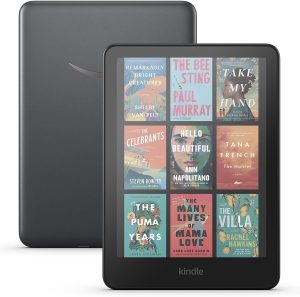
The Kindle Colorsoft is Amazon’s color Kindle eReader. It has a 7-inch Colorsoft display, adjustable light, waterproof design, USB-C charging, and access to the Kindle Store. It can show book covers, illustrations, highlights, comics, charts, and images in color.
For visual books, that is a meaningful upgrade. A cookbook with color photos is easier to use. A graphic novel is easier to follow. A travel guide with maps and pictures makes more sense. Even your Kindle library feels more natural when book covers appear in color.
For plain text, the advantage is smaller. The Colorsoft still works well for novels, but color does not add much to a book that is mostly words.
Kindle Colorsoft Model Information
| Feature | Kindle Colorsoft | Why It Matters |
|---|---|---|
| Display | 7-inch Colorsoft color display | Large enough for most books, though some comics may still feel cramped compared with print or a tablet. |
| Resolution | 300 ppi for black-and-white text, 150 ppi for color | Text stays sharp, while color images are softer than they would be on a tablet. |
| Storage | 16 GB or 32 GB, depending on model | 16 GB is enough for regular books. Heavy comic, manga, and audiobook readers should consider 32 GB. |
| Battery life | Up to 8 weeks, depending on use | Battery life varies with brightness, Wi-Fi, Bluetooth audiobook use, and how often you read. |
| Charging | USB-C; wireless charging on Signature Edition | USB-C is standard. Wireless charging is convenient but not essential for most readers. |
| Water resistance | Waterproof design | Useful for reading near the pool, bath, beach, or kitchen, but it should still be dried after exposure. |
| Best for | Visual readers | Best for comics, graphic novels, cookbooks, children’s books, travel guides, and books with images or charts. |
What the Kindle Colorsoft Does Well
It makes visual books more useful
This is the clearest reason to buy it. Comics, graphic novels, cookbooks, travel guides, children’s books, and illustrated nonfiction are simply easier to enjoy in color. You still get a Kindle-style reading experience, but images, covers, maps, diagrams, and illustrations no longer feel flattened into grayscale.
It makes your Kindle library easier to browse
Color book covers make your library feel more like a bookshelf. If your Kindle library is messy, clean it up before switching devices. Start with How to Organize Your Kindle Library.
It gives color highlighting a real purpose
Color highlights are useful for readers who annotate nonfiction, study, research, or save quotes. You can use different colors for definitions, questions, key ideas, favorite passages, or items you want to revisit.
It keeps the Kindle experience distraction-free
The Colorsoft is still an eReader. It is not trying to be a tablet. That matters if you want color without email, texts, social media, and app notifications.
Where the Kindle Colorsoft Falls Short
The color is muted
Do not expect iPad-level color. Kindle Colorsoft color is softer and more paper-like. That can be easier on the eyes, but it may disappoint readers who expect bright, saturated images.
Some readers may prefer the Paperwhite for text
Amazon notes that the Colorsoft display may look different from a Kindle Paperwhite because of the color filter layer. If you mostly read novels, the Paperwhite may still give you the cleaner, simpler, better-value experience.
The 7-inch screen is not ideal for every comic
Comics and graphic novels look better in color, but the screen is still smaller than a printed comic or a large tablet. If you read detailed comics with small lettering, you may need to zoom.
Color books can use more storage
Regular Kindle books are small. Comics, graphic novels, manga, cookbooks, and audiobooks can take up much more space. If storage becomes an issue, read How to Free Up Storage Space on a Kindle or Amazon’s help page on removing books from a Kindle eReader.
Kindle Colorsoft vs. Kindle Paperwhite
| Reader Type | Better Choice | Reason |
|---|---|---|
| Mostly novels | Kindle Paperwhite | Color adds little to plain text reading. |
| Comics and graphic novels | Kindle Colorsoft | Color helps visual storytelling make more sense. |
| Cookbooks and illustrated guides | Kindle Colorsoft | Photos, maps, diagrams, and images are more useful in color. |
| Budget-focused readers | Kindle or Kindle Paperwhite | You avoid paying extra for a feature you may rarely use. |
| Heavy comic, manga, or audiobook readers | Kindle Colorsoft Signature Edition | The larger storage option is more practical for bigger files. |
Who Should Buy the Kindle Colorsoft?
The Kindle Colorsoft is worth considering if you regularly read books where images matter. That includes comics, graphic novels, cookbooks, children’s books, travel books, craft books, art books, visual guides, or nonfiction with charts and illustrations.
It also makes sense if you like highlighting and want color-coded notes. Students, nonfiction readers, researchers, and book club readers may get more value from color than someone who only reads fiction casually.
Who Should Skip It?
Skip the Colorsoft if your Kindle is mostly for novels, memoirs, thrillers, romance, fantasy, business books, or other text-heavy reading. In that case, the Kindle Paperwhite is probably the smarter buy.
Also skip it if you want bright tablet-style color. The Colorsoft is an eReader first. Its color is useful, but it is not dramatic.
Before You Upgrade
Before moving to a new Kindle, clean up your library and make sure your books are syncing properly. These guides can help:
- How to Organize Your Kindle Library
- How to Free Up Storage Space on Your Kindle
- How to Remove or Delete Books from Your Kindle
- I Purchased a Kindle Book, but It’s Not Showing Up
- 5 Ways to Customize Your Kindle
If your Kindle books are missing after setup, Amazon also has official help for Kindle books not showing in your library and syncing and managing Kindle content.
Final Verdict: Is the Kindle Colorsoft Worth It?
The Kindle Colorsoft is worth it if color is part of what you read. It is a strong upgrade for comics, graphic novels, cookbooks, travel books, children’s books, and visual nonfiction.
It is not automatically the best Kindle for everyone. If you mostly read regular books with plain text, buy the Kindle Paperwhite and save the money. The Colorsoft is not about having the newest Kindle. It is about matching the device to the books you actually read.
Kindle Colorsoft FAQs
Is the Kindle Colorsoft screen as colorful as an iPad?
No. The Kindle Colorsoft uses color E Ink, not a tablet-style LCD or OLED screen. The colors are softer, more matte, and less saturated. That makes the screen easier to read for long periods, but it also means photos, comics, and covers will not look as bright as they do on an iPad, phone, or Fire tablet. If you want vivid color for magazines, video, or web browsing, a tablet is better. If you want a Kindle that can show color while staying focused on reading, the Colorsoft makes more sense.
Does the Kindle Colorsoft still look good for normal books?
Yes. Regular Kindle books are still readable, and black-and-white text is listed at 300 ppi. But the display may look slightly different from a Kindle Paperwhite because the Colorsoft uses a color filter layer. Some readers may notice differences in contrast, screen texture, or brightness. If your reading is almost entirely novels or text-heavy nonfiction, the Paperwhite is probably the cleaner value. If you mix text reading with comics, cookbooks, or illustrated books, the Colorsoft becomes more compelling.
What is the yellow band issue people mention with the Kindle Colorsoft?
Some early Colorsoft buyers reported a yellowish tint or band near the bottom of the screen. Not every device has the issue, but it has been one of the most discussed complaints among early users. When you receive the device, check it on a plain white page at different brightness and warmth settings. If the tint is visible enough to bother you while reading, contact Amazon support or request a replacement while you are still within the return window.
Should I buy the Kindle Colorsoft or Kindle Paperwhite?
Buy the Colorsoft if you read visual books often. That means comics, graphic novels, illustrated children’s books, cookbooks, travel guides, textbooks, or nonfiction with images and charts. Buy the Paperwhite if you mostly read standard ebooks. The Paperwhite is usually the better value for plain text because it costs less and is built around crisp black-and-white reading. The Colorsoft is worth the premium only if color improves a real part of your reading life.
Is 16 GB enough for Kindle Colorsoft?
For regular ebooks, yes. A 16 GB Kindle can hold a large number of standard books because most novels and text-heavy books are small files. The storage question changes if you download comics, manga, graphic novels, cookbooks, image-heavy PDFs, or audiobooks. Those files can be much larger. If you like keeping a big offline library of visual books, the 32 GB model is safer. If you mostly read one or two books at a time and remove downloads when finished, 16 GB is usually fine.
Do comics and graphic novels look good on the Kindle Colorsoft?
They look much better than they do on a black-and-white Kindle, but there are tradeoffs. The color helps with panels, covers, mood, character detail, and visual storytelling. The screen, however, is still 7 inches, so full-page comics can feel smaller than print. Some detailed pages may require zooming. If you want the best possible comic experience, a larger tablet may still be better. If you want comics inside the Kindle ecosystem on an eye-friendly E Ink screen, the Colorsoft is the better Kindle option.
Is the Kindle Colorsoft good for manga?
It depends on the manga. Most manga is black and white, so the Colorsoft may not add much unless the edition includes color pages, covers, or bonus artwork. The 7-inch screen can work well for many manga volumes, but very small text or detailed panels may still require zooming. If you mostly read black-and-white manga, a Paperwhite can still be a strong choice. If you read a mix of manga, comics, and graphic novels, the Colorsoft becomes more useful.
Can you zoom in on images, comics, charts, and maps?
Yes, you can zoom in on images and visual content. This helps with comic panels, maps, diagrams, recipes, and small labels. The main limitation is speed. E Ink screens refresh more slowly than tablets, so zooming and moving around an image may feel less fluid than it does on an iPad or phone. It is useful, but it is not a tablet-like experience.
Does the Kindle Colorsoft support a stylus or handwritten notes?
No. The Kindle Colorsoft is not a writing Kindle. You can highlight and take typed notes, but it does not support pen-based handwritten notes like the Kindle Scribe. If your main goal is writing in notebooks, marking up documents, or using a stylus, look at the Kindle Scribe instead. If your main goal is reading in color, choose the Colorsoft.
Can I use color highlights on Kindle Colorsoft?
Yes. Color highlights are one of the most practical features of the Colorsoft. You can use different highlight colors to separate themes, questions, quotes, definitions, or passages you want to revisit. This is especially useful for nonfiction, school reading, research, book clubs, and professional reading. For casual fiction readers, color highlights may be nice but not essential.
Is the Kindle Colorsoft waterproof?
Yes, the Kindle Colorsoft has a waterproof design. That makes it more practical for reading near water, such as at the pool, beach, bath, or kitchen. Waterproof does not mean indestructible. You should still avoid unnecessary exposure, dry the device after it gets wet, and make sure the charging port is dry before plugging it in.
Does Kindle Unlimited work on Kindle Colorsoft?
Yes. Kindle Unlimited works on the Kindle Colorsoft as long as your subscription is active and the title is included in Kindle Unlimited. Colorsoft may make Kindle Unlimited more interesting if you borrow comics, children’s books, magazines, or visual nonfiction. If a Kindle Unlimited book disappears, check whether the title is still borrowed, whether your subscription is active, and whether your device is synced. You can also read My Kindle Unlimited Book Disappeared. How Do I Get It Back?.
Will my old Kindle books show up on the Colorsoft?
They should, as long as you sign in with the same Amazon account and sync the device. If a book does not appear, check that you are viewing “All” instead of only “Downloaded,” confirm the purchase in your Amazon account, connect to Wi-Fi, and manually sync the Kindle. Amazon’s official help page for Kindle books not showing in your library is a good next step. You can also use Sync and Manage Kindle Content.
Can I remove books from the Colorsoft without deleting them forever?
Yes. Choose “Remove Download” if you only want to clear space on the device. The book stays in your Amazon account and can usually be downloaded again later. Be careful with “Permanently Delete.” That removes the book from your account and all devices. For more detail, read How to Remove or Delete Books from Your Kindle or Amazon’s official help page on removing books from your Kindle eReader.
Why does storage matter more on the Colorsoft?
Storage matters more because the books that benefit most from color often have larger file sizes. A regular novel may take very little space. A graphic novel, illustrated cookbook, children’s book, manga volume, or audiobook can use much more. If your Colorsoft fills up, remove downloads instead of permanently deleting books. If you plan to keep many comics or audiobooks offline, choose the 32 GB model.
Is the Kindle Colorsoft good for kids?
It can be, especially for children who read illustrated books. Color makes covers, drawings, and picture-heavy books more engaging. The downside is cost. If your child mostly reads chapter books, a regular Kindle Kids or Paperwhite Kids may be the better value. If your child reads a lot of illustrated books and you want an eReader instead of a tablet, the Colorsoft Kids model is worth considering.
Does the Kindle Colorsoft have dark mode?
The Colorsoft includes display settings that can make reading more comfortable in low light, including brightness and warmth controls. It also has page color options that can change the look of the reading page. If you are trying to reduce eye strain, adjust brightness first, then warmth, then page color. For related Kindle display settings, see How to Change Font Size and Brightness on Kindle.
Why are my Kindle books not showing on my new Colorsoft?
The most common reasons are account mismatch, library filters, Wi-Fi issues, or sync delays. First, confirm you are signed into the same Amazon account used to buy the books. Then switch your library view from “Downloaded” to “All.” Connect to Wi-Fi and sync the device. If the book still does not appear, check your Amazon content library and try sending the book to the Colorsoft again. Amazon’s help page on troubleshooting Kindle content not appearing is the best official place to start.
Should I wait for a newer Colorsoft model?
If you mostly read text, there is no strong reason to rush into the Colorsoft. A Paperwhite may serve you better right now. If you read comics, cookbooks, illustrated books, or visual nonfiction every week, the Colorsoft already solves a real problem. The smarter question is not “Will a future model be better?” It probably will be. The better question is whether color improves what you read today enough to justify the price.