Amazon is ending support for several older Kindle and Kindle Fire models on May 20, 2026. If you use one of the affected devices, you should still be able to read books that are already downloaded, but you will no longer be able to purchase, borrow, or download new Kindle books directly on that device after the cutoff.
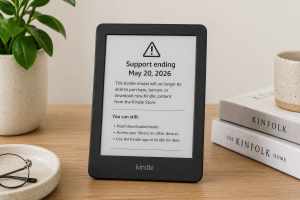
That is the key distinction: your old Kindle is not necessarily turning off. But if it is on Amazon’s affected list, it is becoming much more limited.
For many readers, this will be annoying more than catastrophic. If your books are already downloaded, you can keep reading them. If you want new books, library books, Kindle Unlimited titles, or cloud downloads, you will need to use a newer Kindle, the Kindle app, Kindle for Web, or another supported device.
If your issue is specifically that your Kindle no longer lets you buy books from the device, see our related guide: Kindle Models That No Longer Let You Buy Books.
What Is Changing on May 20, 2026?
Starting May 20, 2026, affected older Kindles will no longer be able to use Kindle Store functions for new content. That means you will not be able to use those devices to buy, borrow, or download new Kindle books. If the device is deregistered or factory reset after the cutoff, it may not be able to be registered again.
You should still be able to read Kindle books that are already downloaded on the device, as long as the device remains registered and you do not reset it.
The practical advice is simple: if you have one of these older Kindles and still use it, download the books you want before May 20, 2026. Do not factory reset it unless you are prepared to stop using it with Amazon services.
No Longer Supported Kindle Models
Amazon’s affected list includes Kindle e-readers and Kindle Fire tablets released in 2012 or earlier. The table below separates the new 2026 support cutoff from the older Kindle Store purchasing change, because those are related but not identical issues.
| Device | Release Year | What Changes After May 20, 2026 | Could It Already Lose On-Device Book Purchasing? | What Readers Should Do |
|---|---|---|---|---|
| Kindle 1st Generation | 2007 | Cannot purchase, borrow, or download new Kindle content on the device. | Not part of the 2022 store-removal list I verified. | Download wanted books before the cutoff and avoid resetting. |
| Kindle 2nd Generation | 2009 | Cannot purchase, borrow, or download new Kindle content on the device. | Yes. Kindle 2nd Gen International was listed in Amazon’s earlier store change. | Use a newer device, Kindle app, or Kindle for Web for new books. |
| Kindle DX | 2009 | Cannot purchase, borrow, or download new Kindle content on the device. | Yes. Kindle DX International was listed in Amazon’s earlier store change. | Keep already-downloaded books and avoid factory reset. |
| Kindle DX Graphite | 2010 | Cannot purchase, borrow, or download new Kindle content on the device. | Likely affected by the broader DX support cutoff. | Download anything important before May 20, 2026. |
| Kindle Keyboard, 3rd Generation | 2010 | Cannot purchase, borrow, or download new Kindle content on the device. | Yes. Kindle Keyboard was listed in Amazon’s earlier store change. | Keep it as a reading device for downloaded books. |
| Kindle 4 | 2011 | Cannot purchase, borrow, or download new Kindle content on the device. | Yes. Kindle 4th Gen was listed in Amazon’s earlier store change. | Use another device to access new Kindle books. |
| Kindle Touch | 2011 | Cannot purchase, borrow, or download new Kindle content on the device. | Not part of the 2022 list I verified, but affected by the 2026 cutoff. | Download books before the cutoff. |
| Kindle 5 | 2012 | Cannot purchase, borrow, or download new Kindle content on the device. | Yes. Kindle 5th Gen was listed in Amazon’s earlier store change. | Use a newer Kindle or Kindle app for new books. |
| Kindle Paperwhite 1st Generation | 2012 | Cannot purchase, borrow, or download new Kindle content on the device. | Not part of the 2022 list I verified, but affected by the 2026 cutoff. | Download books before May 20, 2026. |
| Kindle Fire 1st Gen | 2011 | Book-related Kindle Store functions are affected. | Not part of the earlier e-reader store list. | Other apps and services may still work, but Kindle book access is limited. |
| Kindle Fire 2nd Gen | 2012 | Book-related Kindle Store functions are affected. | Not part of the earlier e-reader store list. | Use a newer Fire tablet, Kindle app, or web option for new books. |
| Kindle Fire HD 7 | 2012 | Book-related Kindle Store functions are affected. | Not part of the earlier e-reader store list. | Download wanted books before the cutoff. |
| Kindle Fire HD 8.9 | 2012 | Book-related Kindle Store functions are affected. | Not part of the earlier e-reader store list. | Keep downloaded books and avoid resetting. |
What Still Works on Unsupported Kindles?
This is not a total shutdown of your Amazon account or Kindle library. Your purchased Kindle books should still belong to your Amazon account. The problem is the older device’s ability to keep talking to Amazon’s store and download systems.
You should still be able to:
- Read books already downloaded on the affected Kindle
- Access your Kindle library on a newer Kindle
- Read through the Kindle app on a phone or tablet
- Use Kindle for Web where available
- Manage content and devices through your Amazon account
Amazon also has help pages for identifying your Kindle e-reader, managing Kindle content and devices, and Kindle software updates. Those are worth checking if you are not sure which model you own or whether your device has the latest available software.
What You Should Do Before May 20, 2026
If you still use one of these older Kindles, do not wait until the last day. The best move is to treat the device like a permanent offline reading library.
Do this now:
- Check which Kindle model you own
- Connect it to Wi-Fi
- Sync your device
- Download the books you know you want to keep reading
- Make sure your favorite books open successfully
- Do not deregister the device
- Do not factory reset the device
- Consider upgrading if you want easy access to new books
This is also a good time to clean up your Kindle library. Download what you actually want on the old device, then use a newer Kindle, phone, tablet, or computer for new purchases.
Should You Upgrade Your Kindle?
If your old Kindle is mostly a backup device, you may not need to rush. Keep your books downloaded and use it until it no longer fits your needs.
But if it is your main reading device, upgrading is probably the cleaner long-term move. The affected devices are old enough that support, battery life, store access, security updates, and syncing are all becoming weaker points.
That does not mean the old Kindle was bad. In fact, the opposite is true. Many of these models lasted a remarkably long time. But once a device cannot reliably download new books, borrow library books, or reconnect after a reset, it stops being a full Kindle and becomes more like a locked bookshelf.
FAQs About Support for Old Kindle Models
Is Amazon shutting down all old Kindles?
No. Amazon is ending support for specific older Kindle and Kindle Fire models released in 2012 or earlier. Newer Kindle models are not part of this cutoff.
Will my old Kindle stop working completely?
Not necessarily. If your books are already downloaded, you should still be able to read them. The bigger issue is that you will not be able to purchase, borrow, or download new content on affected devices after the cutoff.
What date does Kindle support end for these models?
The cutoff date is May 20, 2026.
Can I still read books already downloaded on my Kindle?
Yes. That is the main piece of good news. Already-downloaded books should remain readable as long as the device stays registered and functional.
Can I load up my Kindle now with free books?
Yes. If you have an older Kindle that may lose support, it is smart to download books you want to keep reading before support ends. You can still add free Kindle books to your Amazon account and download them to your device while it is still able to sync and receive new content.
A good place to start is the free Kindle books page, where you can browse current free reads and add a few to your library before the cutoff.
Can I still buy Kindle books on Amazon.com?
Yes, but affected older Kindles will not be able to download new Kindle content after the cutoff. You can still use Amazon.com, a newer Kindle, the Kindle app, or Kindle for Web to access your library.
What happens if I factory reset my old Kindle?
Do not factory reset an affected Kindle unless you are done using it. After the cutoff, affected devices may not be able to be re-registered.
What happens if I deregister my old Kindle?
Deregistering an affected Kindle is risky. After May 20, 2026, you may not be able to register it again.
Is the Kindle Paperwhite affected?
Only the 1st Generation Kindle Paperwhite from 2012 is listed as affected. Newer Paperwhite models are not part of this cutoff.
Is Kindle Keyboard affected?
Yes. Kindle Keyboard, also known as the 3rd Generation Kindle, is on the affected list.
Is Kindle Touch affected?
Yes. Kindle Touch is on the affected list for the May 20, 2026 support cutoff.
Are Kindle Fire tablets affected too?
Yes, some early Kindle Fire tablets are affected for Kindle book functions. Other apps and services may not be affected in the same way, but book purchasing, borrowing, and downloading are the main concern.
Can I still use Libby or library books on an affected Kindle?
After the cutoff, affected devices are expected to lose the ability to borrow or download new Kindle content. If you rely on library borrowing, use a newer Kindle, a phone, a tablet, or another supported reading option.
Can I still use Kindle Unlimited on an old Kindle?
If the device is affected by the 2026 cutoff, you should not count on being able to download new Kindle Unlimited titles directly to it after May 20, 2026.
Will my Kindle library disappear?
No. Your Kindle library is tied to your Amazon account, not just one device. You should still be able to access your books through supported Kindles, Kindle apps, and Kindle for Web.
How do I check which Kindle model I have?
Use Amazon’s Identify Your Kindle E-Reader help page, or check your device settings and your Amazon account’s Manage Your Content and Devices section.
Should I update my old Kindle before the cutoff?
Yes, if an update is available. Amazon’s Kindle software update page is the best place to check for available updates.
Should I download my entire Kindle library?
Probably not. Download the books you realistically want on that old device. Downloading hundreds or thousands of books can be slow and messy, especially on old hardware.
Is this the same as the 2022 Kindle Store change?
No. In 2022, some older Kindles lost the ability to browse, buy, or borrow books directly from the device, but users could still receive newly purchased or borrowed books. The 2026 cutoff is broader because affected devices will no longer be able to purchase, borrow, or download new content through Kindle Store functions.
Do I need to buy a new Kindle right away?
Not always. If your old Kindle already has the books you want and you are happy using it offline, you can keep reading. But if you want easy access to new books, library books, Kindle Unlimited, syncing, and long-term support, a newer Kindle is the safer choice.