Do you want to see all the books you’ve ever ordered on your Kindle? Or do you want to know if you accidentally purchased a book on Kindle? If you’re unsure which books you’ve purchased on Kindle, you’re not alone! Before you try to purchase the same book twice, read on to find how surprisingly easy it is to see your complete order history on your Kindle, the Kindle app, or a PC.
View Your Kindle Purchase History: On Your PC
You can easily find your Kindle order history by going here: https://www.amazon.com/hz/mycd/digital-console/contentlist/booksAll/dateDsc/.
Or follow the steps below:
- First, log in to your Amazon account.
- Click on the tab that reads, “Account & Lists.”
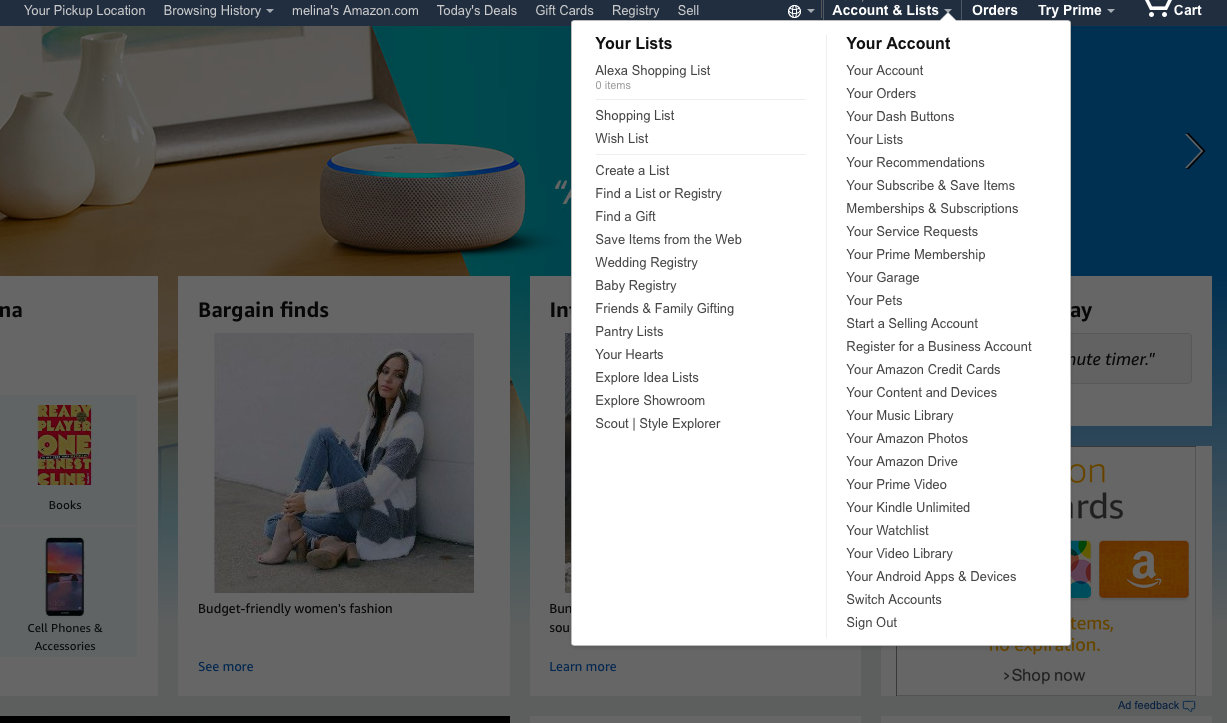
- Click on “Your Account”
- Click on “Manage Your Content and Devices.”
- Select “Books” and “All” on the webpage. Every book you’ve ever purchased will appear here.

If you want to search your purchased books by specific categories, you can sort your books by title, author, or acquired date.
Lastly, if you want to see what you paid for each book go to https://www.amazon.com/gp/your-account/order-history, then select digital orders. You will see all your Kindle orders (as well as music and video orders). To see what you paid you will need to tap to view the invoice for each order.
View Kindle Purchase History on Your Kindle Device or app
On any Kindle device, or on the Kindle app, you can see all of your purchased Kindle books by simply tapping on the “Cloud” icon.
On a Kindle Fire or on the Kindle app, there should be a spot near the bottom of the screen labeled “Cloud/Device.” If you tap “Device,” you’ll see what books are currently stored on your device. Tapping “Cloud” will show you your complete order history.
For older Kindles, the “Cloud” can be found in a section titled, “archived items.”
get free kindle books
Join over 50,000 readers who get our daily newsletter with free and discounted kindle book recommendatioins
Can’t Find a Purchased Book on Your Kindle?
It’s important to note that even if you delete a Kindle book on your device, you can still access it and read it again thanks to storage in the “Cloud.” The Kindle cloud holds all of the Kindle books you have ever purchased, and it allows you to re-download any book to any of your registered devices again and again. So, by following the steps listed above, you should be able to find every purchased item, even if you deleted the book from your device!
However, if you recently bought a Kindle book and it isn’t appearing or downloading on your device, there may be a syncing issue. Amazon suggests these tips for troubleshooting:
- Make sure your device is connected to Wifi.
- Tap “Sync” on your device so new content downloads and updates can appear. Keep in mind that it may take some time for larger files to download.
- Check if your payment went through. Click on “Manage Your Content and Devices,” then go to “Settings.” From here, you can check or update your payment information. If you notice a mistake, you can edit the information and try purchasing the Kindle book again.
How to Re-Download a Kindle Book
While looking through your purchase history, if you stumble upon a great Kindle book you want to re-read, it’s simple to download it back onto your device from the Cloud. On your Kindle or through your Kindle app, follow these 3 steps:
- From the Books homepage of your Kindle Device (or the home screen of your Kindle App) tap the Kindle content library labeled “Books.”
- Tap on the “Cloud” tab to view the books that aren’t currently on your device.
- Simply tap your desired Kindle book to download it. After it downloads, you should see the title appear in your Kindle content.
We hope you find this advice helpful! For book recommendations, free Kindle eBook downloads and more join our newsletter and explore our website.
Here are SEO-optimized FAQs for that article, without numbers or citations:
Frequently Asked Questions
How do I see my Kindle order history?
You can view your Kindle order history by signing in to your Amazon account and going to Manage Your Content and Devices or Digital Orders.
How can I find all the Kindle books I’ve ever bought?
To see every Kindle book you’ve purchased, go to Manage Your Content and Devices, then select Books and view All titles in your library.
Can I check my Kindle purchase history on Amazon.com?
Yes. Amazon.com lets you review your Kindle purchases, browse your full digital library, and look up past digital orders.
How do I know if I already bought a Kindle book?
Search your Kindle library or review your digital orders in your Amazon account to confirm whether you already purchased a specific title.
Can I see what I paid for a Kindle book?
Yes. To check the price you paid, go to your Amazon Digital Orders and open the invoice for the order.
How do I view purchased Kindle books on the Kindle app?
In the Kindle app, go to your library and switch between content stored on your device and content saved in the cloud to see purchased books.
What does Cloud mean on Kindle?
The Cloud shows Kindle books you have purchased but do not currently have downloaded on that device.
Why can’t I find a purchased book on my Kindle?
If a purchased Kindle book is missing, it may not be downloaded yet, your device may need to sync, or there may be an issue with the order or payment.
Can I re-download a Kindle book after deleting it?
Yes. If you bought the book through your Amazon account, you can usually download it again from your Kindle cloud library.
How do I re-download a Kindle book from the cloud?
Open your Kindle library, go to the Cloud section, and tap the book you want to download back onto your device.
Can I see Kindle purchase history on a PC?
Yes. You can log in to Amazon on a PC and use Manage Your Content and Devices or Digital Orders to view your Kindle purchase history.
Can I sort my Kindle books by title, author, or purchase date?
Yes. Amazon lets you sort your Kindle books by options like title, author, and acquired date to make your library easier to search.
What is the difference between Device and Cloud on Kindle?
Device shows books currently downloaded to your Kindle or app, while Cloud shows books linked to your account that can be downloaded again.
Why is my new Kindle book not showing up?
A recently purchased Kindle book may not appear right away if your device is offline, has not synced, or the purchase did not complete properly.
Can I see deleted Kindle books in my purchase history?
Yes. Even if you remove a Kindle book from your device, it should still appear in your cloud library and purchase history if it was bought through your account.